
Portrait Mode — The Most Satisfying Feature I've Built
A Flash of an Idea
I wanted to keep uploading promotional content consistently. Gameplay clips as Shorts seemed like the natural fit — but the game runs in landscape. That's when it hit me: what if I just built a portrait mode directly into the game?
Designing for Shorts
Shorts are primarily consumed on mobile. On desktop, the full frame is visible. But on mobile, the bottom portion of the screen gets covered by UI overlays — comments, like buttons, the works.
My game has a dialogue system anchored at the bottom. That's a problem. Content that matters would be hidden exactly where Shorts viewers would miss it.
The Solution: SubViewport
The answer was Godot's SubViewport.
With SubViewport, I could place different content above and below the main game view — effectively creating a 9:16 frame around the 16:9 gameplay. I didn't leave those zones empty. I filled them with the Talisman Codes logo and gameplay imagery.
The Ratio Problem Remained
But there was still an issue. The game is built on a 16:9 base. Stretching it to fill a vertical frame just broke the proportions. Something had to give.
Responsive Design — From Web to Game
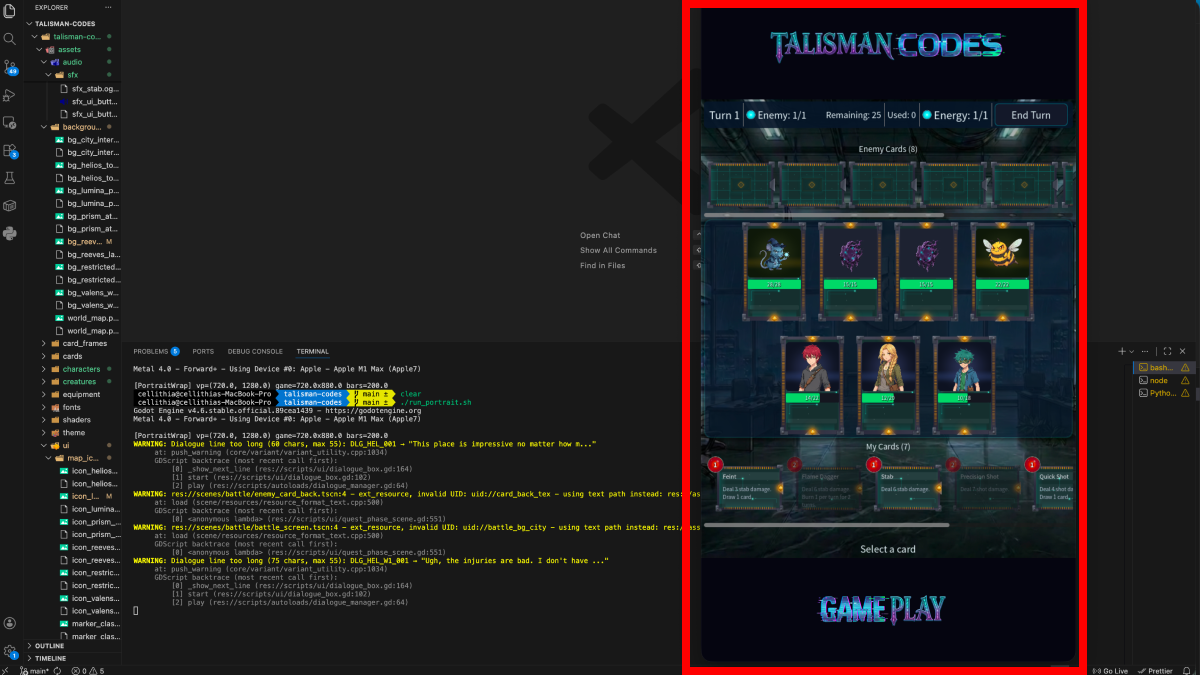
The solution came from web development: responsive layout.
Instead of stretching, I rebuilt the UI from scratch to fit the vertical format. It's not pixel-identical to the desktop version, but it communicates everything the game needs to show. The battle screen was the most interesting part — skill cards that normally display side by side now stack vertically. It actually has its own visual charm.
Worth Every Bit of the Effort
Portrait mode is now live. Gameplay Shorts are going up consistently, and the vertical layout holds up well.
Of everything I've built recently, this one gave me the most satisfaction. A single idea unlocked a whole new way to share the game — and along the way, it made me a better developer.
Comments (0)
No comments yet.